 BlackSnufkin
96ced766e6
BlackSnufkin
96ced766e6
- New 'All' analysis mode: client-side coordinator runs Static + every EDR
  profile in parallel; Dynamic waits only for Static (EDR is on a remote
  VM, no local resource contention). New /analyze/all/<target> route +
  analyze_all.html + analyze-all/core.js. Done banner exposes per-result
  jump links; rows linkify to their saved detail views (no auto-redirect).

- /results/edr/<profile>/<target>: saved-view route that loads the saved
  JSON and renders via the same tools/edr.js module the live page uses,
  so the saved view shows MITRE chips, call stack, triggering API,
  memory region, expandable per-alert detail and raw _source. New
  edr_info.html embeds findings as window.__edrSavedResults; new
  edr-saved.js bootstraps the renderer.

- Whiskers: chunked XOR write (64 KiB working buffer) replaces the
  byte-by-byte loop that was timing out the orchestrator on multi-MB
  payloads. AgentClient gains a separate exec_timeout (180s) for the
  multipart upload + agent-side decode path.

- file_info.html: Dynamic button uses lb-btn-primary to match Static and
  EDR (drops the orphan yellow styling).
LitterBox







Table of Contents
- Overview
- Documentation
- Analysis Capabilities
- Analysis Engines
- Integrated Tools
- API Reference
- Installation
- Configuration
- Client Libraries
- Contributing
- Security Advisory
- Acknowledgments
- Interface
Overview
LitterBox provides a controlled sandbox environment designed for security professionals to develop and test payloads. This platform allows red teams to:
- Test evasion techniques against modern detection techniques
- Validate detection signatures before field deployment
- Analyze malware behavior in an isolated environment
- Keep payloads in-house without exposing them to external security vendors
- Ensure payload functionality without triggering production security controls
The platform includes LLM-assisted analysis capabilities through the LitterBoxMCP server, offering advanced analytical insights using natural language processing technology.
Note: While designed primarily for red teams, LitterBox can be equally valuable for blue teams by shifting perspective – using the same tools in their malware analysis workflows.
Documentation
LitterBox Wiki - Advanced configuration and technical guides
Key sections:
- Scanner Configuration - HolyGrail, Blender, and FuzzyHash setup
- YARA Rules Management - Custom rules and organization
- Configuration Reference - Complete config.yml options
- Architecture & Development - System design and custom scanners
Analysis Capabilities
Initial Processing
| Feature | Description |
|---|---|
| File Identification | Multiple hashing algorithms (MD5, SHA256) |
| Entropy Analysis | Detection of encryption and obfuscation |
| Type Classification | Advanced MIME and file type analysis |
| Metadata Preservation | Original filename and timestamp tracking |
| Runtime detection | Compiled binary identification |
Executable Analysis
For Windows PE files (.exe, .dll, .sys):
- Architecture identification (PE32/PE32+)
- Compilation timestamp verification
- Subsystem classification
- Entry point analysis
- Section enumeration and characterization
- Import/export table mapping
- Runtime detection for Go and Rust binaries with specialized import analysis
Document Analysis
For Microsoft Office files:
- Macro detection and extraction
- VBA code security analysis
- Hidden content identification
- Obfuscation technique detection
LNK Analysis
For Windows shortcut Files (.lnk)
- Target execution paths and arguments
- Machine tracking identifiers
- Timestamps and file attributes
- Network share information
- Volume and drive details
- Environment variables and metadata
Analysis Engines
Static Analysis
- Industry-standard signature detection
- Binary entropy profiling
- String extraction and classification
- Pattern matching for known indicators
Dynamic Analysis
Available in dual operation modes:
- File Analysis: Focused on submitted samples
- Process Analysis: Targeting running processes by PID
Capabilities include:
- Runtime behavioral monitoring
- Memory region inspection and classification
- Process hollowing detection
- Code injection technique identification
- Sleep pattern analysis
- Windows telemetry collection via ETW
HolyGrail BYOVD Analysis
Find undetected legitimate drivers for BYOVD attacks:
- LOLDrivers Database: Cross-reference against known vulnerable drivers
- Windows Block Policy: Validation against Microsoft's recommended driver block rules for Windows 10/11
- Dangerous Import Analysis: Detection of privileged functions commonly exploited in BYOVD attacks
- BYOVD Score Calculation: Risk assessment based on exploitation potential and defensive controls
Elastic EDR Integration
Dispatch a payload to a separate, EDR-instrumented Windows VM and pull the correlated detection alerts back into the LitterBox results page. Built around two new components:
- Whiskers — single-binary Rust agent (
Whiskers/) that runs on the EDR VM and exposes a small HTTP API: lock acquire/release, multipart payload upload, process spawn + kill, stdout/stderr/exit-code capture, agent self-identification (auto-discovered hostname). Single-occupancy by design; no parallel runs. - ElasticEdrAnalyzer — orchestrator on the LitterBox side that dispatches a payload to a registered EDR profile and queries the operator's self-hosted Elastic stack for alerts raised against the run.
Capabilities include:
- Two-phase orchestration — Phase 1 (lock + exec + log fetch on the agent) returns in ~1-7s; Phase 2 (Elastic correlation) polls in the background with early-return on first hit and an 8-second settle window for related-alert bursts. Lock is released after Phase 1 so back-to-back dispatches don't queue.
- Per-payload alert correlation — query is scoped by
host.name(case- insensitive) AND filename match acrossfile.name/process.name/file.path/process.executable, so concurrent dispatches don't mix alerts. - AV-block detection — Whiskers tags the run as
viruswhen Defend intercepts on file write or spawn; orchestrator surfaces the prevention alert as a distinctblocked_by_avoutcome. - EDR-kill detection — when the agent didn't issue the kill but the process exited non-zero, the run is labeled "killed by EDR behavior protection".
- Rich alert detail — per-alert expandable panel with rule reason, rule
description, MITRE ATT&CK tactic/technique chips, triggering API + behaviors,
memory region + protection flags, full call stack with module provenance,
final user module callout, process tree (spawned + parent), Defend's response
actions (kill targets, tree kills), user identity, raw
_source. - Detection-Score contribution — high/critical EDR alerts add up to +50 to the file's overall Detection Score; AV blocks add +35.
The integration is profile-driven — drop one or more Config/edr_profiles/*.yml
files (gitignored; ship-as *.example.yml) and each registered profile gets
its own "Run with X" tab on the upload page. Deployment is operator-managed:
- Elastic stack — LitterBox does not deploy or manage it. Point at a self-hosted instance you stood up via elastic-container-project.
- EDR VM — bring your own Windows VM with Elastic Agent + Elastic Defend
enrolled to your stack. Drop
Whiskers.exeon it, allow inbound port 8080, optionally register as a Windows service.
Default index pattern queried:
.ds-logs-endpoint.alerts-default-*,.internal.alerts-security.alerts-default-*
(Elastic 9.x layout). Override per-profile with elastic_index_pattern if your
deployment differs.
Doppelganger Analysis
Blender Module
Provides system-wide process comparison by:
- Collecting IOCs from active processes
- Comparing process characteristics with submitted payloads
- Identifying behavioral similarities
FuzzyHash Module
Delivers code similarity analysis through:
- Maintained database of known tools and malware
- ssdeep fuzzy hash comparison methodology
- Detailed similarity scoring and reporting
Integrated Tools
Static Analysis Suite
- YARA - Signature detection engine
- CheckPlz - AV detection testing framework
- Stringnalyzer - Advanced string analysis utility
- HolyGrail - BYOVD Hunter
Dynamic Analysis Suite
- YARA Memory - Runtime pattern detection
- PE-Sieve - In-memory malware detection
- Moneta - Memory region IOC analyzer
- Patriot - In-memory stealth technique detection
- RedEdr - ETW telemetry collection
- Hunt-Sleeping-Beacons - C2 beacon analyzer
- Hollows-Hunter - Process hollowing detection
EDR Integration Suite
- Whiskers (this repo,
Whiskers/) - Single-binary Rust HTTP agent for EDR-VM dispatch - Elastic Defend - EDR backend (operator-deployed via elastic-container-project)
API Reference
File Operations
POST   /upload                    # Upload samples for analysis
GET    /files                     # Retrieve processed file list
Analysis Endpoints
GET    /analyze/static/<hash>            # Execute static analysis
POST   /analyze/dynamic/<hash>           # Perform dynamic file analysis
POST   /analyze/dynamic/<pid>            # Conduct process analysis
GET    /analyze/edr/<profile>/<hash>     # Render EDR results page (uses analysis_type=edr)
POST   /analyze/edr/<profile>/<hash>     # Dispatch payload to EDR profile (Phase 1 sync, Phase 2 background)
HolyGrail BYOVD Analysis
POST   /holygrail                 # Upload driver for BYOVD analysis
GET    /holygrail?hash=<hash>     # Execute BYOVD analysis on uploaded driver
Doppelganger API
# Blender Module
GET    /doppelganger?type=blender               # Retrieve latest scan results
GET    /doppelganger?type=blender&hash=<hash>   # Compare process IOCs with payload
POST   /doppelganger                            # Execute system scan with {"type": "blender", "operation": "scan"}

# FuzzyHash Module
GET    /doppelganger?type=fuzzy                 # Retrieve fuzzy analysis statistics
GET    /doppelganger?type=fuzzy&hash=<hash>     # Execute fuzzy hash analysis
POST   /doppelganger                            # Generate database with {"type": "fuzzy", "operation": "create_db", "folder_path": "C:\path\to\folder"}
Results Retrieval (JSON)
GET    /api/results/<hash>/info             # Retrieve file metadata
GET    /api/results/<hash>/static           # Access static analysis results
GET    /api/results/<hash>/dynamic          # Obtain dynamic analysis data
GET    /api/results/<pid>/dynamic           # Retrieve process analysis data
GET    /api/results/<hash>/holygrail        # Access BYOVD analysis results
GET    /api/results/<hash>/edr              # List EDR profiles run for this hash
GET    /api/results/<hash>/edr/<profile>    # Read saved findings for a specific EDR profile (used by Phase-2 polling)
GET    /api/edr/profiles                    # List registered EDR profiles
HTML Report Generation
GET    /api/report/          # Generate comprehensive HTML report (target = hash or pid)
GET    /api/report/?download=true  # Download report as file attachment
GET    /report/              # Download report directly (redirects to api with download=true)
Web Interface Results
GET    /results/<hash>/info      # View file information
GET    /results/<hash>/static    # Access static analysis reports
GET    /results/<hash>/dynamic   # View dynamic analysis reports
GET    /results/<pid>/dynamic    # Access process analysis reports
GET    /results/<hash>/byovd     # View BYOVD analysis results
System Management
GET    /health                   # System health verification
POST   /cleanup                  # Remove analysis artifacts
POST   /validate/<pid>           # Verify process accessibility
DELETE /file/<hash>              # Remove specific analysis
Installation
Windows Installation
System Requirements:
- Windows operating system
- Python 3.11 or higher
- Administrator privileges
Deployment Process:
- Clone the repository:
git clone https://github.com/BlackSnufkin/LitterBox.git
cd LitterBox
- Configure environment:
python -m venv venv
.\venv\Scripts\Activate.ps1
pip install -r requirements.txt
Operation:
# Standard operation
python litterbox.py

# Diagnostic mode
python litterbox.py --debug
Access:
- Web UI:
http://127.0.0.1:1337 - API Access: Python client integration
- LLM Integration: MCP server
Linux Installation
System Requirements:
- Linux operating system
- Docker and Docker Compose
- Hardware virtualization support
Deployment Process:
- Clone the repository:
git clone https://github.com/BlackSnufkin/LitterBox.git
cd LitterBox/Docker
- Run automated setup:
chmod +x setup.sh
./setup.sh
Note
: Initial setup takes approximately
1 hourdepending on internet speed and system resources.
The setup script automatically:
- Installs Docker, Docker Compose, and CPU checker
- Verifies KVM hardware virtualization support
- Creates Windows 10 container environment with automated LitterBox installation
- Starts containerized Windows instance
Access:
- Installation monitor:
http://localhost:8006(track Windows setup progress) - RDP access:
localhost:3389(available after installation completes, creds in docker file)
Once installation completes, LitterBox provides:
- Web UI:
http://127.0.0.1:1337 - API Access: Python client integration
- LLM Integration: MCP server
For API access, see the Client Libraries section.
Configuration
All settings are stored in config/config.yml. Edit this file to:
- Change server settings (host/port)
- Set allowed file types
- Configure analysis tools
- Adjust timeouts
Elastic EDR Setup (optional)
The Elastic EDR integration is opt-in — drop one or more profile YAMLs under
Config/edr_profiles/ and the upload page picks them up at boot. End-to-end
the workflow has three pieces, all operator-managed:
1. Stand up an Elastic stack — LitterBox does not deploy or manage one. The fastest path is elastic-container-project which gives you Elasticsearch + Kibana + Fleet locally. Once it's up:
- Enable the Elastic Defend integration on a Fleet policy
- Enroll your EDR Windows VM into that policy
- Optionally enable Detection-Engine rules in Kibana → Security → Manage → Rules
- Create an API key under Stack Management → API keys with read access to
.alerts-security.alerts-*,.internal.alerts-security.alerts-*, and.ds-logs-endpoint.alerts-*. Copy the encoded value.
2. Deploy Whiskers on the EDR VM — Whiskers.exe is a single-binary Rust
agent (~1.5 MB, no runtime deps). See Whiskers/README.md
for the full deployment guide. Quick version:
# on the EDR VM (Windows VM with Elastic Defend enrolled)
mkdir C:\Tools -Force
# copy Whiskers.exe into C:\Tools\

New-NetFirewallRule -DisplayName "Whiskers Agent" -Direction Inbound `
    -Protocol TCP -LocalPort 8080 -Action Allow

C:\Tools\Whiskers.exe --port 8080
# OR register as a service
sc.exe create Whiskers binPath= "C:\Tools\Whiskers.exe --port 8080" start= auto
sc.exe start Whiskers
You'll likely need to add Whiskers.exe as a Trusted Application in Defend's
policy (Kibana → Security → Manage → Trusted Applications), since the agent
spawns arbitrary payloads.
3. Configure the LitterBox profile — copy
Config/edr_profiles/elastic.yml.example to elastic.yml (the real file is
gitignored) and fill in:
name: "elastic"
display_name: "Elastic Defend"
agent_url: "http://<edr-vm-ip>:8080"
elastic_url: "https://<elastic-stack-ip>:9200"
elastic_apikey: "<base64-encoded-key-from-step-1>"
elastic_verify_tls: false              # self-signed cert from elastic-container-project
wait_seconds_for_alerts: 90            # max poll window for successful execs
av_block_wait_seconds: 60              # max poll window for AV-block events
exec_timeout_seconds: 60               # how long to let the payload run
hostname is not configured — the agent self-reports it via
GET /api/info, so moving the agent to a different VM is transparent. Restart
LitterBox after editing the YAML; the upload page will gain a "Run with X"
tab per registered profile.
Client Libraries
For programmatic access to LitterBox, use the GrumpyCats package:
The package includes:
-
grumpycat.py: Dual-purpose tool that functions as:
- Standalone CLI utility for direct server interaction
- Python library for integrating LitterBox capabilities into custom tools
-
LitterBoxMCP.py: Specialized server component that:
- Wraps the GrumpyCat library functionality
- Enables LLM agents to interact with the LitterBox analysis platform
- Provides natural language interfaces to malware analysis workflows
Contributing
Development contributions should be conducted in feature branches on personal forks. For detailed contribution guidelines, refer to: CONTRIBUTING.md
Support 🍺
If LitterBox has been useful for your security research:

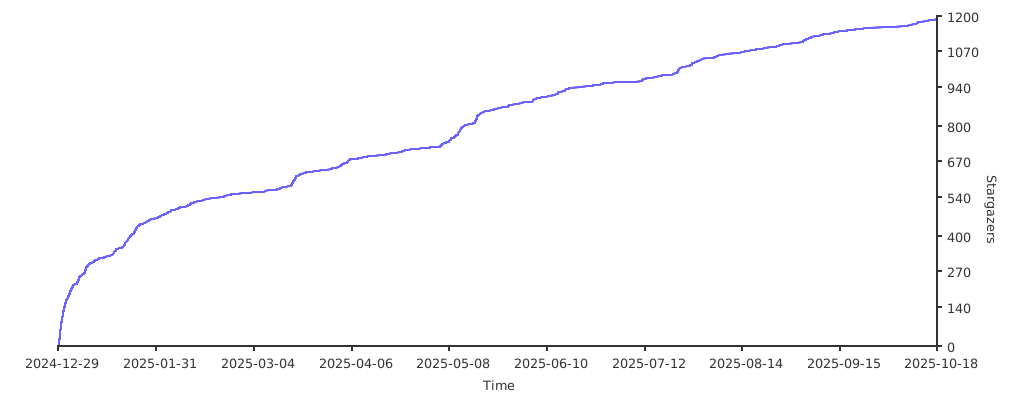
Stargazers 🌟
Security Advisory
- DEVELOPMENT USE ONLY: This platform is designed exclusively for testing environments. Production deployment presents significant security risks.
- ISOLATION REQUIRED: Execute only in isolated virtual machines or dedicated testing environments.
- WARRANTY DISCLAIMER: Provided without guarantees; use at your own risk.
- LEGAL COMPLIANCE: Users are responsible for ensuring all usage complies with applicable laws and regulations.
Acknowledgments
This project incorporates technologies from the following contributors:
Interface
